



You know the drill. You click a link. You wait. You go make coffee, flip through a magazine, or maybe just stare at the ceiling until the page loads. If your modem sounds like a dying robot, you’re on dial-up. And you’re probably wondering if the net is getting worse or if your patience is just thinning.
The truth is a bit of both. Your connection speed hasn’t changed. Phone lines have a hard bandwidth cap. But the internet has gotten heavier. Pages are bloated. More people have broadband, so developers feel free to pack sites with high-res images and scripts that choke slow connections. Squeezing that data through a dial-up pipe takes time. It’s not magic. It’s physics.
But there is a middle ground. You don’t need to rip out the phone line and install broadband to get faster loads. Services like NetZero and EarthLink are pushing “high-speed dial-up.” They promise speeds up to five times faster than traditional dial-up. How? It’s not magic. It’s servers.
The handshake bottleneck
That chirping noise? That’s the handshake protocol. It’s the conversation your modem has before it can send a single byte of data. It’s the first thing that kills your speed.
The process has two parts. First, the modem handshake. This is hardware. Your modem initializes the line. High-speed providers can’t speed this up. It’s physics. You’re limited by the copper wire in your wall.
Second, the software handshake. This is where the magic happens. It’s about authentication. Your computer introduces itself to the ISP. This part can be accelerated.
Acceleration servers explained
High-speed dial-up services use acceleration servers to bypass the slow software handshake. Instead of your modem talking directly to the ISP’s authentication server over a long distance, it talks to a local server. The local server handles the authentication. It’s faster. It’s closer. It cuts out the lag.
Does this mean dial-up is back? No. But it means you can squeeze more out of what you have. It’s not about new wires. It’s about smarter routing.
For users stuck on dial-up, the difference is noticeable. Pages load faster. Images appear sooner. It’s not broadband. It’s not seamless. But it’s better than waiting for coffee to brew. And sometimes, better is enough.
The question isn’t whether dial-up is dead. It’s whether you’re willing to wait for the rest of the world to catch up. Or if you’ll take the acceleration.
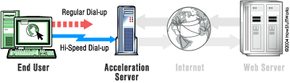

The standard internet handshake is a bureaucratic nightmare disguised as a technical protocol. Your computer says hello. The ISP server says hello back. Then comes the interrogation. Who are you? Which John Smith are you? Do you have an account number? Yes. What is it? 5546743897. Ah, yes. You’re in.
It sounds simple. It is not. That back-and-forth exchange consumes time. Time you don’t have when you’re trying to load a page before your coffee gets cold. Standard dial-up forces every new session to undergo this full bureaucratic review. It is slow by design, or perhaps by evolution.
High-speed dial-up providers decided to cut the red tape. They built a system where machines remember their previous conversations. The next time you connect, you don’t start from scratch. Your machine says hello. The server recognizes you immediately. It already knows your name, your account number, and your permissions. The conversation shrinks from a dozen exchanges to a single nod.
This optimization is not cosmetic. It cuts the handshake duration by up to 50 percent. A connection that previously took 45 seconds might now establish in 30. Those seconds matter. They add up across hundreds of daily connections. But the handshake is only the beginning. The real bottleneck lies elsewhere.
The Bottleneck Between the Server and Your Modem
When you type a URL into your browser, the request travels through your ISP to the wider internet. It hops through routers and DNS servers. Eventually, it reaches the web server hosting the page you want. The connection opens. Data begins to flow.
Then it hits your dial-up line.
Your modem is the weak link. It translates digital signals into analog tones and back again. It is slow. It is noisy. It struggles with the volume of data moving from the web server to your screen. The web server might be pushing data at high speed, but your modem can only pull so much at a time. The rest sits in a queue, waiting for the narrow pipe to clear.
This is where acceleration servers change the game.
How Acceleration Servers Work
ISP providers install specialized software on their infrastructure. This software turns specific servers into acceleration servers. These servers sit between your dial-up connection and the rest of the internet. They act as a middleman, a buffer, and a speed booster all at once.
Here is what happens when you search for a page using this system:
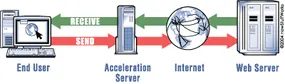
Your request leaves your modem and reaches the ISP’s acceleration server. The server does not wait for your slow connection to fetch the content. Instead, it uses its own broadband connection to reach the web server hosting the page. It fetches the data quickly. It processes it. Then it sends it to you.
The acceleration server optimizes the data before it reaches your modem. It compresses images. It strips out unnecessary code. It reorganizes the information so it travels more efficiently over your dial-up line. You receive the page faster because the heavy lifting was done on the ISP’s end, not yours.
This is not magic. It is engineering. It is about recognizing that the bottleneck is not in the internet, but in the last mile. The acceleration server bridges that gap. It absorbs the lag. It smooths the flow.
The result is a web experience that feels less like wading through mud and more like walking on pavement. It is still dial-up. It is still not fiber. But it is faster. And in the world of internet access, faster is often the only thing that matters.
Does this mean dial-up is dead? Not yet. It means providers are squeezing every drop of performance from an outdated technology. They are making the old new again. For now, that is enough.

The secret to high-speed dial-up isn’t magic. It’s a triad of techniques working in the background: compression, filtering, and caching. These acceleration servers act as aggressive middlemen, squeezing every ounce of speed out of your slow connection. Let’s look at how they actually drop the pedal on your data.
The Compression Engine
File compression is the heavy lifter here. If you’ve ever wondered how a massive webpage loads quickly on a 56k modem, it’s because of how data is packed. There are two main approaches: lossy and lossless.
Text files demand lossless compression. When you save a document or load an HTML page, you need it to be exactly as it was before. Lossless algorithms pack the data tightly but unpack it perfectly. No bits lost. No errors introduced.
Images, however, have more flexibility. They can use lossy compression. The goal here is speed, not archival perfection. A photo with 2 million colors might be stripped down to 16,000 colors. To the human eye, the difference might be negligible. To your modem, it’s a massive reduction in data. Some providers, like NetZero, let you tweak this balance. You can decide if you’d rather see a sharp image or load the page faster.
But compression isn’t a universal fix. It’s evolving, and it hits walls. Here is what actually gets accelerated by these servers:
- HTML and Java-based web pages
- Plain text
- JPG and GIF graphics
- Standard email messages
And here is what gets left behind:
- Streaming media (audio or video)
- Secure web pages (HTTPS)
- Music or photos attached to emails
- Software downloads
Why the exclusion? It comes down to the nature of the data. On-the-fly file compression simply cannot touch certain types. Take secure websites. The data is encrypted. To the compression server, it looks like random gibberish. You can’t compress random noise. If the server altered even one character in an encrypted stream, the security protocol would break. The data would become unreadable. So, the server does nothing. It passes encrypted traffic through untouched.
For the files it can handle, the process is aggressive:
- Text: The server compresses HTML and email text on the fly. You’re looking at a 50% reduction in size. That’s half the data traveling over your line.
- Images: GIFs and JPGs are read and recompressed. The file size shrinks by 50% to 90%. Banner ads, often low-res anyway, get hit hard here.
- Already-Compressed Files: MP3s, Zip files, and videos are already compressed. An MP3 is already a fraction of the original CD size. Trying to compress it further is computationally expensive and yields tiny results. The server skips it. Secure pages are skipped too.
The result? A web page that would take minutes now loads in seconds. But compression is only half the battle.
Filtering and Caching
Once the data is compressed, the server looks for what can be removed entirely. This is filtering. And it remembers what it has already fetched. This is caching.
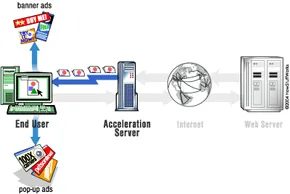

When you type a URL into your browser, you aren’t just asking for a webpage. You’re requesting a complex bundle of code, images, and scripts. If that page relies on pop-up advertising, there are hidden parameters buried in the programming. These instructions tell your machine exactly how big the ad is and where it should sit on your screen. The ad launches only when that hidden code executes.
The problem? These ads consume bandwidth. They slow down the transmission of data to your machine, turning a quick load into a sluggish wait.
To fight this drag, high-speed dial-up providers bundle a pop-up blocker with their software. The blocker scans incoming code for those tell-tale ad parameters. When it spots them, it rejects the request. No ad. Less data sent over the phone line. Faster load times. It’s a simple trade-off: sacrifice the annoying clutter for speed.
Caching
Caching is the other half of the acceleration equation. The first time you visit a site, your browser downloads the entire page. Text. Images. Scripts. If the browser saves these elements, the next time you visit, it checks for duplicates. If an image hasn’t changed, there’s no need to download it again. This process of saving files for future reuse is called caching.
High-speed dial-up takes this a step further with server-side caching. The acceleration server tracks which pages are requested most often by all subscribers. Instead of contacting the original server thousands of times a day for the same homepage, the accelerator asks once. It stores the page in its memory. When another subscriber requests the same site, the accelerator just transmits the stored page from its own memory. Redundant requests are eliminated. Time is saved.
There’s also client-side caching to consider. Browsers like Internet Explorer or Netscape are designed to cache frequently viewed pages on your local machine. This cuts down on load times for repeat visits without needing to hit the network at all.
Which matters more? The server-side caching or the local browser cache? It depends on how often you return to the same sites. But both work to keep the data flowing faster.
The tech works because it anticipates what you want before you even ask. It’s not magic. It’s just efficient. Still, some users complain about seeing outdated content. The cache holds onto old versions of pages. How do you know if what you’re seeing is fresh? You clear your cache. Or wait for the server to invalidate the old data. It’s a balancing act between speed and accuracy.
Most people don’t think about caching. They just want the page to load. And for the most part, it does. Quickly. Quietly. Without the pop-ups blocking the view.
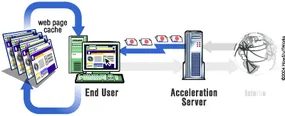

The browser doesn’t just let data float away. It saves those cached pages directly to your hard disk. High-speed dial-up software takes this basic feature and pumps it up. It stores the pages you view most often, yes. But it also hunts for elements that never change.
Take the HowStuffWorks homepage. Most of it shifts daily. The software ignores the moving parts. It locks onto the logo, the header, the navigation bar, and the search box. These stay static. The software notes this consistency. It saves those elements locally. Next time you visit, it only loads what has changed.
You can see how caching saves time by avoiding unnecessary data transmission. The system doesn’t waste bandwidth on pixels that haven’t moved. This is where the real magic happens. Combine server-side caching with client-side caching, and the tool starts learning.
It learns your surfing habits. It uses that data to streamline your connection process. The more you use it, the faster it gets. It’s not just a tool. It’s a learning engine optimizing your specific workflow.
Compression, filtering, and caching are the three pillars of dial-up acceleration. But what happens when you stack them? Does performance actually improve? Is the gain noticeable to a human eye?
The answer is yes. In the next section we test NetZero to see how these techniques handle real-world web pages.
High-speed Dial-up: The Bottom Line
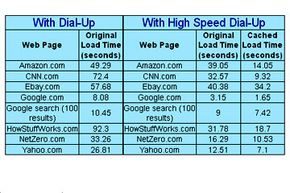

Understanding the mechanics is one thing. Seeing the actual performance numbers is another. We picked NetZero, one of the more established players in the high-speed dial-up space, to see if the marketing claims held up against real-world usage.
We signed up, stuck to the default “out of the box” configurations, and started clicking. The goal was simple. Compare standard dial-up latency against the accelerated connection.
The results were mixed but generally positive.
We hit the same set of popular websites repeatedly. Some loaded instantly. Others took their time. But on average, the difference was measurable. A typical page load that used to drag on now felt snappier. For example, the HowStuffWorks homepage loaded three times faster with the acceleration service enabled.
It wasn’t magic. It was just smart engineering.
By caching data closer to the user and compressing traffic before it travels over the telephone line, the bottleneck shrinks. The connection doesn’t get physically faster, but it gets more efficient.
Why This Matters for Non-Broadband Users
This isn’t just about shaving seconds off a page load. It’s about extending the relevance of an aging technology.
Standard dial-up is slow. Painfully so for modern web standards filled with ads, scripts, and high-res images. But many people are still stuck on it. They can’t afford cable or fiber. They live in areas where broadband doesn’t exist. Or they simply prefer the simplicity of a single phone line.
High-speed dial-up bridges that gap.
It offers a middle ground. You get the accessibility of dial-up with a performance boost that makes the web actually usable. It’s not DSL. It’s not cable. But it’s better than what you had yesterday.
If these compression and caching technologies keep improving, dial-up might not die out as quickly as predicted. It could become a niche, viable option for a subset of users who don’t need gigabit speeds but hate waiting ten minutes for a webpage to render.
For more details on how these acceleration methods work or other related topics, check out the links on the next page.


