
You probably think of a file as the thing inside it. The text in a Word doc. The pixels in a JPEG. But that’s only half the story. The other half is invisible. It’s the data about the data. We call that metadata. And for over two decades, Adobe’s standard for handling it has been XMP.
XMP stands for Extensible Metadata Platform. Adobe dropped it in April 2001 alongside Acrobat 5.0. It wasn’t just a feature update. It was a move to standardize how software describes content across different programs. Before XMP, metadata was a mess. Each app did its own thing. XMP fixed that by creating a universal language for file descriptions.
What exactly are metadata and why do they matter?
Metadata isn’t the content. It’s the label on the jar.
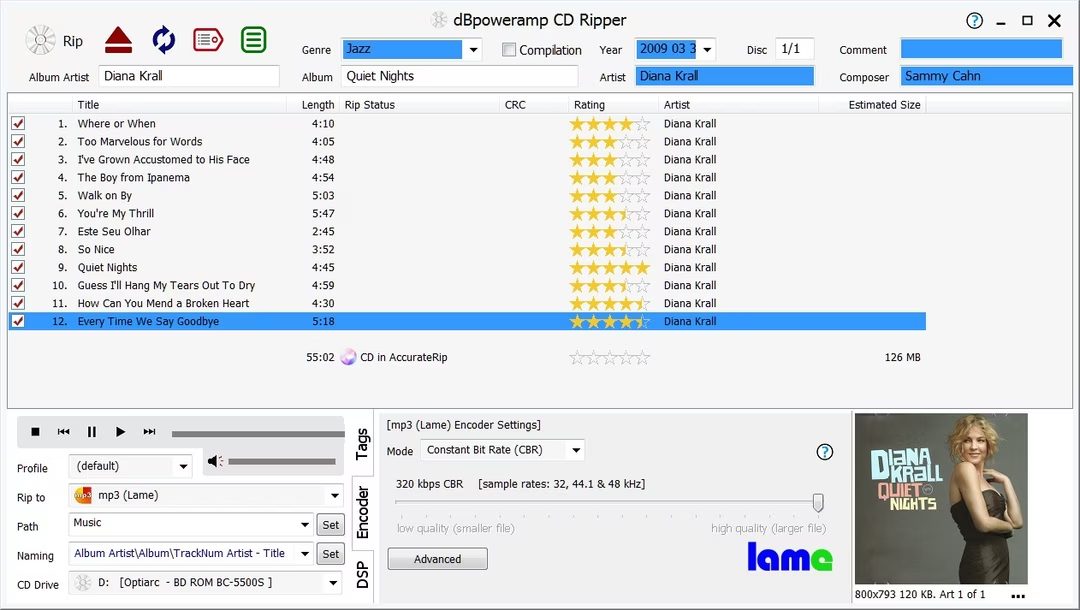
Think of a music album. Let’s say Brol by Angèle. The audio tracks are the content. You hear them. You feel the bass. But before the music plays, your player needs to know what it’s playing. That’s metadata.
- The album title
- The cover art
- The track names
- The artist name
None of that is in the audio waveforms. It’s data attached to the file. Without it, your library is just a folder of track01.mp3 files. Useless. XMP handles this kind of descriptive data for PDFs, images, and more. It tells your software what the file is, where it came from, and how it should be treated.
It matters because computers are terrible at guessing. They need instructions. XMP provides those instructions in a format that almost every creative app understands. You edit a photo in Lightroom. You add keywords. You export to Photoshop. Those keywords stick. That’s XMP doing the heavy lifting.
Without it, your workflow breaks. You lose data. Or worse, you save over it with conflicting info. XMP keeps the record straight. It’s the quiet engine under the hood of modern digital publishing.
Why XMP metadata lives inside the file
Earlier examples showed metadata sitting in separate online databases. That’s clean. It’s also fragile.
Adobe tried to fix this with XMP.
It was a push to standardize how we tag digital assets. The engine under the hood is XML. That matters because XML is flexible. You can invent tags on the fly. Want to track a creator? Create a
XMP is not just a format. It is a container.
Here is the difference that changes everything.
With a CD, the metadata (track names, artist info) often lives separately from the audio data. XMP embeds the data directly into the file.
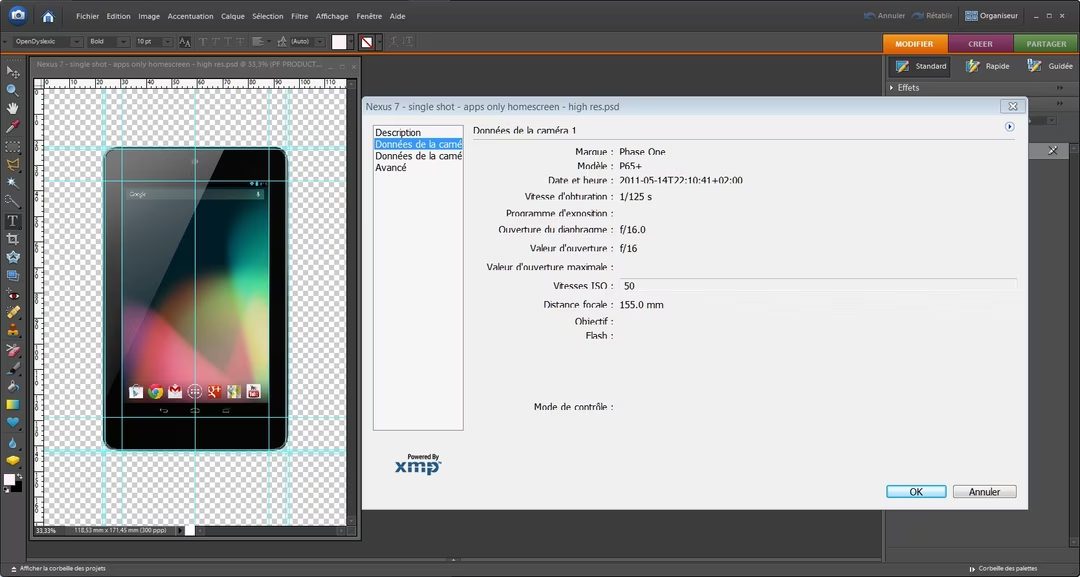
Take a photo edited in Photoshop. You save it as a PDF. The XMP packet travels with it. It carries the author’s name. It lists the camera model. It records the image resolution.
The data sticks to the asset. Move the file. The metadata moves too.
This solves a common workflow problem. You don’t need a central database to remember which camera took which shot. The file remembers.
But it also means the file gets heavier. And it means you have to trust the software writing those tags.
If you are managing thousands of assets, this embedded approach is a blessing. If you are archiving for fifty years, it is a risk. XML parsers change. Formats shift. The tag you invented today might be nonsense tomorrow.
Still. For the average user? It just works. The info is there. In the file. No external lookup required.
What metadata actually lives inside XMP files
XMP isn’t some obscure code reserved for developers. It’s the backbone of how creative software remembers what you did. Most people see this in Adobe apps. Photoshop uses it. Lightroom relies on it heavily. But it’s not just an Adobe silo. Open-source tools like Gimp adopted it too. Even Flickr, the photo sharing giant, integrated XMP years ago.
You might wonder why any of this matters for your workflow. It matters because metadata is invisible context. Without it, a file is just pixels. With XMP, it’s a document with a history.
Here is what you can actually tag using the XMP standard:
- Title : The human-readable name of the file.
- Description : A short summary of what the image shows.
- Keywords : Tags for searchability.
- Author : Who created the content.
- Copyright : Legal ownership details.
That list isn’t exhaustive. It’s just the basics. The point is structure. In early 2012, XMP got its official seal of approval. It became an ISO standard, specifically ISO 16684-1. That status changed how software vendors treated it. It went from a proprietary extension to a recognized protocol.
How XMP handles IPTC data from news agencies
News agencies have their own rules. They don’t just use random tags. The International Press Telecommunications Council, or IPTC, manages a specific metadata standard for press images. For decades, this was the gold standard for journalists and photographers selling to wire services.
For a long time, XMP and IPTC felt like separate worlds. One for creatives, one for newsrooms. That friction disappeared around 2004.
The systems learned to talk to each other. IPTC data can now be converted into XMP. XMP can be converted back into IPTC. It’s a two-way street.
This compatibility solved a major headache. You no longer had to choose between creative flexibility and agency compliance. You could embed IPTC-style data into an XMP packet. Your photo editing software reads it. The news agency’s ingestion system reads it.
So when you see “IPTC” in your software settings, don’t panic. It’s just older terminology wearing a modern wrapper. The underlying structure is often XMP now. This interoperability means your metadata travels with your image, regardless of where it ends up. Whether it’s in a Lightroom catalog or a Reuters wire, the data persists.