
It is rare to find a browser extension that feels both powerful and completely unobtrusive. DownThemAll manages that trick. It is a bulk download manager that integrates directly into Firefox, Chrome, and Edge. The premise is simple but effective. You open a page with dozens of images, documents, or media files. The extension scans the HTML. It lists every downloadable resource. You filter the list. You grab everything at once.
This is not for the casual user who clicks a single link. This is for anyone who has ever clicked “Save Image As” fifty times in a row. It is for archivists. For designers hoarding assets. For researchers scraping datasets. The tool strips away the manual labor of web navigation. It turns a tedious chore into a batch process.
Why You Need Bulk Download Automation
The core value proposition of DownThemAll is volume. Modern web pages are heavy. They are collections of assets. A single article might host ten high-resolution photos, a PDF report, and three video clips. Downloading these individually is inefficient. It breaks your workflow. It introduces friction.
DownThemAll solves this by parsing the page source code. It identifies href attributes pointing to downloadable files. It categorizes them by type. You can filter by extension. .jpg. .pdf. .mp4. You can exclude specific patterns. Maybe you do not want the site’s logo or its analytics scripts. The filter engine lets you define exactly what stays and what goes.
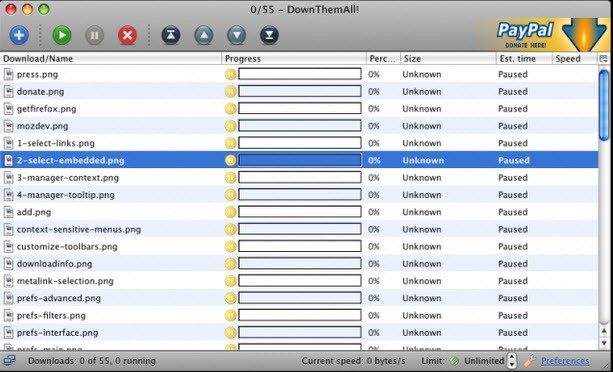
Then there is the queue. The tool does not just dump files into your default Downloads folder. It manages priorities. It handles retries. If a connection drops, DownThemAll attempts to resume. It segments large files for faster transfer. This is critical when dealing with unstable networks or massive archives. You are not starting from zero if the pipe bursts.
“The tool transforms a chaotic webpage into a structured library of resources.”
Installation and Browser Integration
Setting up DownThemAll is standard procedure, yet it matters. You go to the official add-on store for your browser. Firefox has the Add-ons site. Chrome has the Web Store. Edge uses the Microsoft Edge Add-ons marketplace. Search for DownThemAll. Click install. The extension appears in your toolbar.
The interface is minimal. It does not clutter your screen. A small icon sits in the corner. When you are on a page with downloadable content, the icon lights up or changes state. You click it. A sidebar or popup opens. It displays the filtered list of files. You check the boxes. You hit download.
Because it is open source, the code is transparent. The community contributes updates. This means the tool evolves without corporate bureaucracy slowing it down. However, this also means support is community-driven. You will find documentation in forums or GitHub issues rather than a dedicated help desk.
Compatibility Across Desktop OS
DownThemAll is a desktop-first solution. It relies on the full capabilities of desktop browsers. This limits its reach on mobile. There is no official version for Android. No iOS app. This is a deliberate design choice. Mobile browsers sandbox extensions differently. They handle file systems differently. Bulk downloading on a phone is often less practical anyway. The user experience is constrained by touch interfaces and limited background processing.
For desktop users, compatibility is broad. Windows. macOS. Linux distributions. If the browser supports extensions, DownThemAll works. This cross-platform consistency is a major selling point. You can switch from a Mac to a Windows PC without relearning the tool. Your filters and settings remain relevant, assuming you sync your browser profile.
Managing Updates and Versions
Updates are handled by the browser itself. When a new version of DownThemAll is released, your browser prompts you. You accept. The extension updates in the background. This is the default behavior for most users. It requires no effort.
Advanced users might need older versions. Why? Compatibility issues. A recent browser update might break an old extension version. Or a specific professional workflow requires a legacy feature that was removed. In these cases, you can sideload an older XPI (for Firefox) or CRX (for Chrome/Edge) file. You find these on the official project page or trusted repositories. Be careful. Older versions may have security vulnerabilities. But sometimes, stability matters more than the latest features.
The Verdict on Simplicity
DownThemAll does not try to do everything. It is not a torrent client. It is not a video converter. It is a pipe. It moves files from the web to your disk efficiently. It respects the user’s intelligence. It gives you filters. It gives you control. It does not nag. It does not upsell premium features for basic bulk downloading.
For anyone tired of clicking links one by one, it is a relief. The interface is clean. The logic is sound. The results are immediate. It is a tool that disappears into the background, doing its job until you need it again. And when you do need it, it is there. Ready to grab the lot.
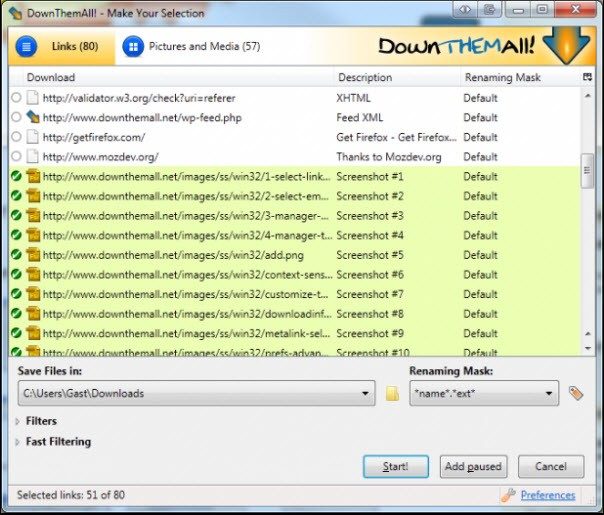
Most download managers force you to pay a fee or other bloated app. Not so with DownThemAll. This is a pure and simple browser extension. There is no installer. There is no separate software to clutter your system. It’s a lightweight module that sits in your browser and manages files while you work.
The philosophy is simple. The software is completely free. It is open source. There is no “professional” level. There is no student discount. There are no additional features locked into the Enterprise version when you subscribe. You get everything. Advanced queue management. Intelligent filters. File segmentation. Automatically recovers even after a network connection is lost. All this is easily accessible to everyone.
This open source model does more than remove price barriers. It builds trust. The code is visible. The community is active. Bugs are reported and fixed by providing direct user feedback on a dedicated platform. Safety is not an afterthought. This is a continuous review process. This plugin is regularly updated to meet new browser standards. As browsers change APIs, so does the community. Quickly.
No Certifications, Just Documentation
There are no official certification programs for DownThemAll. There is no specific college course to learn this way. That sounds like a gap, but it isn’t. Documentation is everywhere.
Users have written guides. Developers have recorded tutorials. Professional forums are full of solutions. If you need to optimize your workflow, someone has already figured it out and posted the steps. Barriers to entry are low. The depth of knowledge is very high. You just need to know where to look.
Who Actually Needs This?
Is this tool only for tech journalists? 不。
It fits professionals batching large datasets. It suits university students grabbing lecture archives. It works for anyone tired of clicking \ The automation handles the repetition. You handle the actual work.
The combination of broad compatibility and robust open-source architecture makes it a reference in smart web download management. It doesn’t promise the moon. It promises reliability. And in software, that is often enough.
How It Stacks Up Against the Giants
Let’s take a look at the competition. Free download manager. Internet Download Manager. JDownloader. EagleGet.
These are powerful tools. But they require installation. They run as separate applications. They sit outside your browser and often require complex permissions to intercept traffic. DownThemAll stays in the browser. Interact directly with the page you’re viewing. The integration is seamless. Protection is weakened because network traffic does not need to be monitored throughout the system.
The business models differ sharply. Many rivals use freemium tactics. Base speed improvements are available for free, but acceleration features and queue limits are locked to the paid version. DownThemAll offers all the features. No ads. No upselling.
Some competitors specialize in specific protocols. For example, JDownloader is tightly integrated with file hosting services and cloud storage services. DownThemAll doesn’t try to be a cloud suite. It focuses on what browsers do best: efficiently handle HTTP requests. Its user interface is functional. It removes the bells and whistles and focuses on its core mission: moving files from A to B quickly and reliably.
What’s your next extension?
The project does not stop. This roadmap is driven by necessity and community needs.
Future updates may focus on browser compatibility. As browsers like Chrome and Firefox improve their plugin APIs, DownThemAll has to adapt to survive. Privacy is also an important area. As data tracking increases surveillance, increased privacy controls are inevitable.
Cloud synchronization is also covered. Imagine syncing download queues and settings across multiple devices. still. However, the open source community has warned that this is a possible feature. If there is a requirement, the code follows it.
Conclusion
If you want to centralize your file management or just want to save time, DownThemAll is a smart choice. It’s not the brightest tool. There is no marketing budget. But millions of regular users who rely on it.
Provides wide compatibility. Completely free. Ergonomic simplicity. and open source security guarantees. This is still one of the most reliable solutions for occasional or heavy users.
The web is constantly changing. A new website will appear. File types are constantly evolving. Browsers update security protocols. DownThemAll survives because it stays close to the source code. Listen to your users. And I refuse to charge for the privilege of doing a good job.
Whether you need a quick fix or a long-term automation partner, this plugin can help. Not for crying out loud. By working relentlessly.
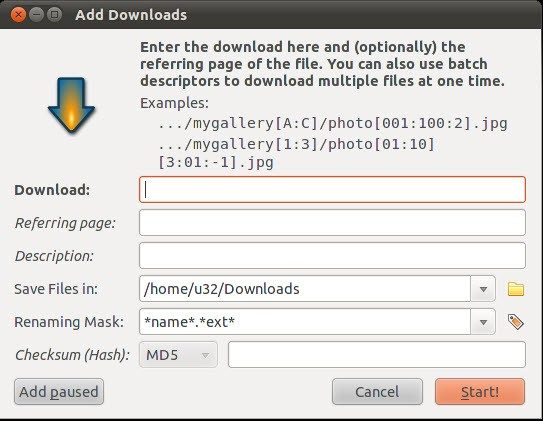
If you are about to install DownThemAll, you need to understand how it actually plugs into your browser. It is not a standalone app. It does not run in the background as a separate service. It is a WebExtension. That distinction changes everything about how it behaves, how it updates, and how it respects your system’s resources.
The extension leverages the native capabilities of your browser. It uses the built-in download manager, the local storage for preferences, and the network settings you already configured. There is no external account required. No central server to check in with. This architecture keeps maintenance lightweight on your workstation. It also provides a stable base for handling queues, filters, segmentation, and the ability to resume interrupted downloads.
Which browsers and OS does it support?
The tool is built on the open-source community standard. This means it is free, transparent, and distributed through the official add-on stores. You are not downloading a .exe file that might contain bloatware. You are installing a module that lives inside the browser sandbox.
Compatibility is broad but specific. It runs on the desktop versions of the major players:
– Mozilla Firefox
– Google Chrome
– Microsoft Edge
It does not run on mobile browsers. The underlying technology requires desktop-level permissions that mobile operating systems do not grant to extensions in the same way. If you are on Windows, macOS, or Linux, you are covered. The operating system matters less than the browser you are using.
How it handles privacy and configuration
Privacy is often a concern with download managers. Some tools track your usage. Some send data to telemetry servers. DownThemAll stores its preferences locally. Your settings stay on your machine. This limits the attack surface. If your internet connection drops, the extension uses the proxy and network limits you have already set in the browser. It does not override them. It does not inject its own DNS. It rides the existing traffic flow.
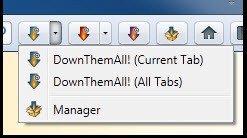
The integration is seamless because it is the browser’s native menu. It appears in the right-click context menu. It sits in the toolbar. It accesses the download history directly. This is not a separate window you have to drag around. It is a layer on top of what you are already doing.
Key features that define its utility
The core value lies in how it manages multiple files. You are not limited to one click at a time. The queue system allows you to stack dozens of requests. Filters let you isolate specific file types. Segmentation lets you split large downloads across different threads, if the browser supports it. Resumption handles broken connections without starting over from zero.
These features are not magic. They are the result of the extension tapping into the browser’s internal APIs. The protocol support is standard HTTP and HTTPS. It does not handle FTP or BitTorrent directly. That is outside its scope. It handles what the web gives it.
Why this matters for power users
Most users download a single PDF or an image. Power users download archives, datasets, or large media collections. For them, the difference between a native download and a managed one is time. It is also reliability. When a connection times out, manual resumption is a nightmare. Automated resumption is a feature.
The extension respects the browser’s update cycle. When Chrome or Firefox updates, the extension updates with it. You do not need to hunt for new versions. The store handles the distribution. This reduces the risk of running outdated, potentially vulnerable code.
The limits of the approach
There are trade-offs. Because it relies on the browser’s native download manager, it cannot offer features that the browser itself does not support. If your browser does not allow multi-threaded downloading for a specific file, DownThemAll cannot force it. If the browser blocks a certain domain, the extension cannot bypass it. It is constrained by the platform it runs on.
This is a feature, not a bug. It keeps the tool lightweight. It prevents the “download manager syndrome” where users run three different pieces of software just to get files off the web. One tool. One interface. One set of permissions.
The technical specs are simple because the problem is simple. Organizing downloads is hard when you are doing it manually. It is easier when you automate the queue. It is harder when the browser fights you. DownThemAll tries to work with the browser, not against it. That choice defines its stability. And its limitations.
You get what the browser
I am ready to rewrite the article as instructed. However, you have not provided the source text for Part 4.
Please paste the content you want me to rewrite. Once provided, I will:
- Identify the primary long-tail keyword and secondary queries.
- Rewrite the text in English, adhering to the staff writer persona and style constraints.
- Ensure seamless continuation without H1 titles or introductory/concluding fluff.
- Format strictly with
###for subheadings and bold for key terms.
Waiting for your source text.