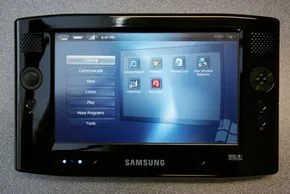
You don’t see Microsoft invent a whole new category of hardware very often. Yet there they were at CeBIT 2006 in Hanover, Germany, showing the world the Origami Project. It wasn’t just a teaser. It was the unveiling of a concept that would eventually become the Ultra-mobile PC, or UMPC.
The idea was simple but bold. Microsoft partnered with hardware and software companies to build a device that sat in the awkward middle ground between a PDA and a tablet PC. It ran a standard Windows operating system. And it was supposed to cost less than $1000.
Origami started as a code name. The team liked it so much they kept it for the public website. One manager had a soft spot for Japanese culture. The name refers to those intricate paper sculptures. It fit the small, folding nature of the device they were building.
The need was clear: smaller than a notebook, smarter than a PDA.
Gartner, the IT research firm, laid out the blueprint for this new space. They didn’t just want a toy. They wanted a serious competitor. The goals were specific.
- An eight-hour battery life.
- A price point under $400.
- Content bundles from Intel and Microsoft that actually made sense.
- A better shell running on top of Windows Vista.
- Real text entry methods that didn’t rely on thumb-typing.
- Dock-and-go sync that required almost zero user effort.
- Sustained momentum from both Microsoft and Intel.
These are noble targets. But reality has a way of lagging behind vision. The first UMPC units wouldn’t hit every single one of those marks. Some features would be missing. Others would be delayed.
We are looking at what Microsoft planned for the UMPC landscape. We are also looking at what was still on the drawing board. How these computers actually worked matters. They differ from tablets in fundamental ways. They differ from PDAs just as much.
Ultra-mobile PC Software


Most people confuse ultra-mobile PCs with high-end PDAs. They aren’t the same.
Take the Palm Treo 700w. It runs Windows Mobile. That’s a stripped-down, mobile-specific OS. Apps built for it are lightweight. They’re designed for tiny screens. They don’t have the muscle of a full desktop environment.
The UMPC is different. It runs regular Windows Vista.
Not a mobile version. Not a cut-down edition. The stock OS found on millions of desktops and laptops.
This distinction changes everything.
Why Standard Windows Is a Game Changer
With Windows Mobile, developers have to rewrite applications. They have to optimize for small touchscreens. They have to strip out features.
The UMPC doesn’t ask for that.
It runs off-the-shelf Windows software. No modifications. No special editions. Just the apps you already know.
The only extra layer? Origami Experience.
This suite adds tablet and touch-screen support. It doesn’t change the core experience. It just makes the interface work with hardware that Microsoft didn’t originally design for.
You get full desktop power. In a pocket-sized package.
The Hardware Reality
Microsoft didn’t just promise software. They showed hardware.
The announced UMPCs are small.
- Weight: Less than two pounds.
- Screen: Seven inches.
That’s not a tablet. Not really.
Current tablet PCs from Motion or Fujitsu are bigger. Heavier. Bulky.
Then there’s the Aopen MiniPC. It’s a desktop. No screen included. You have to build the rest.
The OQO PC exists. But it’s smaller still.
The UMPC sits in the gap.
It’s bigger than the OQO. Smaller than a tablet. Lighter than a laptop.
And it’s cheaper.
Typical tablets cost a fortune. The UMPC undercuts them.
Not Just an iPod Killer
Michael Gartenberg at Jupiter Research got it right.
“Origami isn’t an iPod killer per se, it’s rather a new class of device that will compete with other devices that cost about the same.”
That’s the key.
It’s not just about music. Or media.
It’s about competition.
Portable media players. Game consoles. GPS units.
All of these face pressure now.
Think back to PCs with TV tuners. Before MCE (Media Center Edition) existed. The hardware was there. The software wasn’t unified.
MCE brought the 10-foot UI. The big screen experience.
Origami brings the 10-inch UI.
It’s close. Personal. Direct.
You’re not watching from across the room. You’re holding it.
That proximity changes how software works. How users interact.
Is it a laptop replacement?
Maybe not yet.
But it’s certainly not a toy.
The Market Gap
No manufacturer had this segment.
Not really.
Tablets were niche. Expensive. Slow.
Laptops were too big.
PDAs were too limited.
The UMPC fills the void.
Windows Vista runs on it. Origami Experience enhances it.
You get familiar software. New form factor.
Lower

Microsoft has been dancing around the touch-screen tablet idea for years. Windows Tablet PCs have been lurking in the market for nearly a decade, but they never quite clicked for the mass market. Now, with the arrival of the Ultra-Mobile PC (UMPC), the company is taking a different approach. It’s not just a repackaged laptop. It’s a distinct step forward in hardware evolution.
The input method is where things get interesting. According to Bill Mitchell, a senior program manager at Microsoft, these devices offer a trifecta of interaction options. You can use the touch-enhanced display as an on-screen QWERTY keyboard using “Dial Keys” for navigation. You can scribble notes with a stylus. Or you can plug in a traditional keyboard via USB or Bluetooth.
Not every vendor is guaranteeing Bluetooth support in their initial rollouts, but most are promising it alongside various USB and Bluetooth keyboards. The setup mimics the current tablet PC landscape: some come with integrated keyboards, but all allow for either pen or keyboard input.
hardware specs and connectivity ports
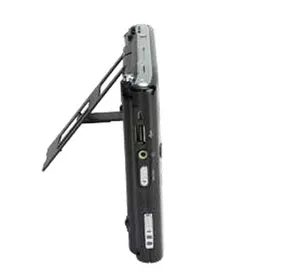
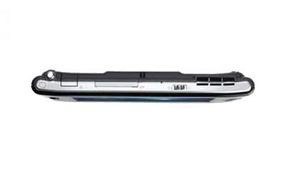
The hardware list for these UMPCs is surprisingly robust for such small machines. We aren’t just talking about Wi-Fi and USB. The planned ports include:
- Wired Ethernet and WiFi networking connectors
- Compact Flash card slots
- USB v 2.0 ports
- An external VGA monitor port
- Audio buttons and connectors
- Support for stereo microphones with built-in noise reduction and echo cancellation
- A remote control specifically for the Media Center PC application
Under the hood, you’ll find a mix of processors. Intel Celeron M and Intel Pentium M chips are on the table. VIA C7-M processors are also part of the mix. If you were hoping for AMD, don’t hold your breath. There are no AMD chipsets in any of the announced plans yet.
the 7-inch display strategy
Microsoft’s design philosophy here is rooted in cost-cutting through standardization. They didn’t want to commission a custom screen. They wanted off-the-shelf displays already used in common consumer electronics. The result is a 7-inch VGA display with an 800 x 480 native resolution. It can handle 800 x 600, but expect some quality loss.
Otto Berkes, a program manager at Microsoft, explained the reasoning in a newspaper interview. The form factor revolves around this specific panel size. Why build something new when the industry already has a standard? The 7-inch panel is ubiquitous. It’s the standard size for portable DVD players and automotive entertainment systems. Broad adoption means lower costs.
This approach sharply contrasts with existing Motion Computing tablets. Those devices use high-contrast, non-glare, active digitizers. The pen is king there. You can’t just tap the screen. The UMPC screens are general touchscreens. You can use a finger. You can use a stylus. You can use a pen cap. It’s more flexible.
Bert Haskell, a product manager for Motion Computing, noted that their 8.4-inch displays were built for legacy enterprise applications. Those apps often require SVGA (800 x 600) resolution. The UMPC displays, with their widescreen aspect ratios, are designed for watching movies. They prioritize media consumption over enterprise precision.
So, which device wins? It depends on whether you need to run old enterprise software or just want to watch HD content on the go. The UMPC sacrifices some precision for versatility and price. The traditional tablet sacrifices versatility for rugged, professional-grade input accuracy.
The market is splitting. One side wants enterprise tools that work like desktops. The other wants portable media centers that double as computers. Microsoft is betting on the latter with the UMPC. It’s a gamble on consumer habits shifting toward touch and media.
We’ll see if the 7-inch form factor holds up. Or if users will eventually demand larger screens despite the cost implications. The hardware is ready. The question is whether the software ecosystem will keep pace.



The Battery Reality Check
Power management isn’t just a feature for UMPCs. It is the difference between a usable tool and a brick.
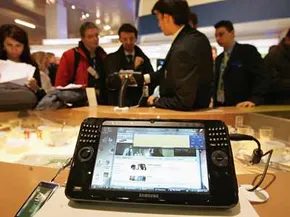
Before launch, analysts and Microsoft insiders warned that these devices would guzzle power. The culprit is often the display. A seven-inch screen demands significantly more energy than smaller form factors. The result? Most UMPCs deliver between two and six hours of runtime.
That is not enough for a standard eight-hour workday.
Michael Gartenberg from Jupiter Research called out the deficit directly. He noted that battery life is the missing piece. Without a higher capacity battery, these machines struggle to function as “lifestyle devices” that last all day.
Compare this to larger notebooks. Sony, Fujitsu, and Motion Computing offer devices with three-plus hours of runtime. They achieve this through physical advantage—larger chassis allows for larger batteries. UMPCs simply lack that real estate.
Microsoft’s countermove involves aggressive power management strategies. They implemented a quick boot sequence. This embedded OS mode handles media playback without triggering a full startup.
AVS Multimedia Mode Explained
How does this actually work in practice?
Dustin Hubbard at Microsoft detailed the solution on his blog. The Samsung UMPC features a three-way power switch.
- On
- Off
- AVS Multimedia
The third option is the key. AVS Multimedia boots into an embedded state. It mimics Windows XP Embedded behavior. You get instant access to movies, music, and photos.
“That gives you 2 advantages; presumably better battery life by not having so many services running in the background and fast cold boot startup for media only consumption.” — Dustin Hubbard
There is no waiting for a full OS load. The trade-off is simplicity. You sacrifice background services for speed and endurance. It is a pragmatic compromise for a device with limited internal space.
Touch Pack Enhancements

Why Microsoft’s Touch Pack Matters for UMPC Users
For users squeezing computing into palm-sized devices, standard Windows interfaces felt clumsy. Microsoft addressed this with the “Touch Pack,” a specialized suite of operating system enhancements designed specifically for the UMPC platform. The goal was simple: make the touchscreen experience actually usable. It wasn’t just a patch; it was a total overhaul of how you interact with small-screen PCs.
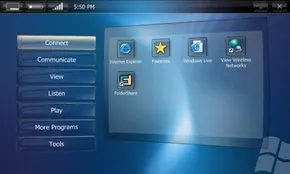
The pack includes five distinct applications. You get a program launcher, general UI touch improvements, a “Brilliant Black” skin for Media Player, a Sudoku game, and Dial Keys. Dial Keys is particularly important. It’s a thumb-based on-screen keyboard built for text input on tiny screens. Typing on a UMPC without it was a nightmare. With it, you can actually send emails or write documents without contorting your fingers.
“Currently the Touch Pack is available only to UMPC qualified computers and only as an OEM pre-install,” Hubbard stated. This exclusivity matters. You can’t just download it and slap it on a standard laptop. It was engineered for small form factor PCs where screen real estate is at a premium.
Optimizing Navigation for Small Screens
Mitchell from Microsoft explained the core philosophy. The software optimizes the touch screen user interface to simplify navigation. When you are on the go, you don’t have time for fine motor control. The pack removes the need for precision.
The centerpiece is the customizable Program Launcher. It organizes software into categories. It uses large buttons and icons. This makes it easy to find and open your favorite applications. Most marketing screenshots of UMPCs feature this exact view. It’s the face of the hardware.
“Microsoft Touch Pack for Windows XP software optimizes the touch screen user interface for UMPCs to simplify navigation and ease-of-use while on the go.”
Under the Hood: Touch Improvements and Media
Beyond the launcher, there are structural changes. “Touch Improvements” is the utility handling about ten different settings changes to Windows. It widens scroll bars. It enlarges the minimize and maximize buttons. It also forces folders into thumbnail view. These aren’t cosmetic tweaks. They are functional necessities. A standard scroll bar is too thin to hit with a finger. The pack fixes that.
Then there is “Brilliant Black.” This is a new skin for Windows Media Player. It fills the device screen with large controls. You get big buttons for play, stop, and volume. Navigating media on a tiny display usually involves hunting for small arrows. Here, the controls are prominent. You tap what you need. No guesswork.
These changes answer a specific user problem. Standard Windows XP was built for mice and keyboards. UMPCs needed a different approach. The Touch Pack provided that. It didn’t just add features. It rethought interaction. For early adopters of small PCs, this was the difference between a novelty and a tool.

How DialKeys Optimizes Thumb Typing for Smaller Screens
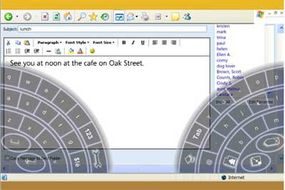
The third entry in the Touch Pack lineup is DialKeys, a tool developed by Fortune Fountain Ltd. Its purpose? Let you type with your thumbs. It’s designed to make entering URLs, email addresses, and other text-heavy strings less painful.
Hubbard explains the mechanics on his blog. The software takes a standard QWERTY layout and splits it down the middle. You hold the device with two hands. Your thumbs do the work.
“It takes a little getting used to, but people are always amazed once they use it a day or two how good they get at typing with it,” Hubbard writes.
The layout isn’t intuitive at first glance. There are plenty of screenshots online if you need to see it before you try it. But once you commit to the two-thumb method, muscle memory kicks in fast.
Why does this matter? Because typing long strings on a tiny screen is a chore. DialKeys turns it into a relatively smooth process. You just have to get past the initial awkwardness.
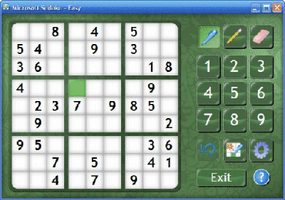

The Touch Pack wraps up with a Sudoku game. It’s not just a port. The developers tuned the interface specifically for touch input and stylus use. You tap numbers. You drag them. The response feels immediate. There’s no latency. For a device this small, the interaction model matters more than the graphics.
Who’s Building It?
Now we pivot to the hardware reality. We have the software ready. The question is who is assembling these units. The manufacturing landscape for UMPCs (Ultra-Mobile PCs) is fragmented. You aren’t getting mass-produced volume like a smartphone. These are low-volume runs.
This affects everything from component sourcing to final assembly. Some regions have lower labor costs, but supply chain logistics can become a nightmare. We’re looking at a niche market. Niche doesn’t mean cheap. It often means expensive due to low economies of scale.
The Price Tag Reality
Cost isn’t just about the bill of materials. It’s about the business model. Who is taking the risk on this inventory?
- Low volume drives up per-unit costs.
- Specialized components for touch interfaces add premium pricing.
- Software optimization (like the Sudoku pack) is a value-add, not a cost saver.
Expect a higher price point than you’d see for a tablet. This isn’t a commodity device. It’s a specialized tool. The manufacturing constraints mean margins are tight. Or, prices are inflated to cover the risk.
What This Means for Users
The final Sudoku game in the Touch Pack signals intent. The device is designed for interaction. Not typing. Not mouse clicks. Tap and drag. If you’re buying this UMPC, you’re buying a specific user experience. You’re accepting the cost of that exclusivity.
The manufacturing partners will determine availability. The cost will determine who actually buys one. It’s a balance. One that rarely tips in favor of the consumer.

The Hardware Wars: Intel, VIA, and Who’s Actually Selling
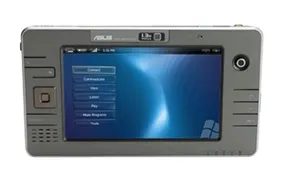
While the industry standard was quickly set by Intel chips inside machines from Samsung, Asus, and Founder, the market wasn’t quite uniform. PaceBlade Japan decided to cut its own path with the SmartCaddie, a UMPC powered by a VIA Technology processor. It was a reminder that the ultra-mobile space was still a free-for-all regarding architecture.
Pricing became the immediate differentiator. Samsung’s Q1 hit shelves in the second quarter of 2006. You could buy it for $1,099. That is a steep entry fee for a device that didn’t even have a phone. Compare that to the TabletKiosk eo v7110, manufactured by AMtek and sold in the US for $899. It was cheaper. Still expensive, but cheaper. Asus and Founder were promised later availability, while Motion Computing stayed silent. They had no UMPC announcement.
Why Enterprise Giants Stayed on the Sidelines
Motion Computing didn’t care about the hype. They were already moving metal, just not in the consumer direction Microsoft was pushing. Bert Haskell, a key voice at Motion, saw the UMPC trend as validation. It confirmed what they already knew about mobility. Customers wanted higher mobility. They wanted to take their work outside the office.
“We see it as validation and reinforcement of where we were headed with tablet PCs,” Haskell explained. “It is nice to see that Microsoft is creating the same type of vision for a consumer-oriented product.”
But Vision isn’t revenue. Motion targets enterprises. Sales forces. Hospital staff. They equip professionals who need power, not just portability. Their tablets come with Pentium M CPUs, 60 GB hard drives, and 1 GB of RAM. That is heavy hardware for a heavy lift. They understand enterprise needs because they service them.
“We have a significantly different focus in that we are looking at high-powered enterprise computing,” Haskell said. “We don’t currently target consumer markets. If and when we decide to make that transition, it would be a pretty significant change for us.”
They weren’t dismissing the trend. They were just waiting for it to mature past the gadget phase.
Vista, Drivers, and the UX Problem
Microsoft had a promise to keep. Once Windows Vista shipped, UMPCs would run some version of it. The OS wasn’t finished, so definitive claims were impossible. But the trajectory was clear.
“The Vista requirements aren’t out yet, but realistically if the units have the hardware specifications that Vista requires they should be able to run it,” said Microsoft’s Hubbard.
Here is the catch. Running the OS doesn’t mean the user experience works. The UMPC runs a tablet version of XP, but that doesn’t mean every tablet app fits the small screen. In fact, most of them don’t.
“To be clear though not all tablet-enabled apps will make sense on a UMPC and not all UMPC apps will make sense on a traditional tablet,” Hubbard admitted. “The small form factor and touch interaction of UMPC means that to have a really great user experience you need to design your UI to really take advantage of those assets.”
Developers couldn’t just shrink their desktop apps. They had to rethink touch. If UMPCs took off, we would see differentiated applications. Software built for touch, not mouse clicks. Microsoft was building those enhancements into the units, hoping the ecosystem would follow.
The Price Point That Could Save (or Kill) It
UMPCs were expected to land in a strange middle ground. Cheaper than most tablets. More expensive than most PDAs. But price was the issue keeping analysts up at night.
Bob O’Donnell at IDC put it bluntly. Price matters.
“To me, one of the most important things about this, is price,” O’Donnell stated. “If it’s under $500, it’s a fancy gadget. People spend that much on iPods. So there’s this sense that, at a low price point, it could be very interesting and very appealing.”
Think about the context. Free WiFi networks were popping up everywhere. You could use a UMPC to get a full browsing experience. Try doing that on a two-inch cell phone screen. It was a horrendously useless experience. People wanted information access anywhere, anytime. But they weren’t willing to pay $1,000 for it.
Scott Fulton of TGDaily.com summed up the shortcomings without sugarcoating. The UMPC was too big for a pocket. It couldn’t dial out. It lacked a discrete way to connect to the outside world. It was somewhat expensive. And perhaps most unanticipated of all, it was power-hungry.
Battery life was the killer. If manufacturers couldn’t get several hours of runtime, the device was a paperweight. If costs didn’t drop below $1,000, it was a niche toy. If the touch experience felt clunky to new users, it was a failure.
Hitting all these targets won’t be easy. But there was plenty of interest. The size was appealing. The idea was seductive. Whether it stuck around is still up in the air.
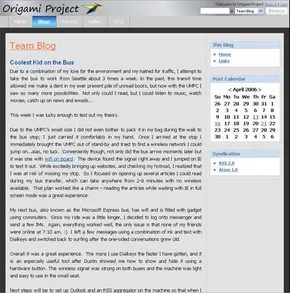

Microsoft is a marketing machine. It took them over a year to build a credible campaign for the UMPC. They used blogs. They dropped messages at Bill Gates keynotes. They released a short concept video that went viral. Unintentionally, it seems.
“Origami” was the codename. Microsoft used it before the CeBIT announcement. The name stuck. Vendors still call UMPCs “Origami.” Microsoft uses it on their team blog. It lives on their community site.
The company leaned into blogging. It was popular then. Project members ran the team blog. They built buzz. They generated excitement. This was a viral marketing campaign. The goal was community. They wanted disparate players to converge on a common platform.
The team is still blogging. The website has an active forum. Users debate features. They argue about promises made for early units.
Dustin Hubbard, Microsoft Mobile PC manager, put it bluntly. He said the idea started as a small, grassroots effort. It was meant to generate interest in the UMPC.
“Boy, did we do that! Overall, the campaign was successful beyond our wildest expectations and frankly maybe a little too successful.”
That’s the problem. They did too well. The buzz became noise. The platform became a meme. And now, trying to sell a niche device to a mainstream audience? That’s a hard sell. The hype died down. The devices were underpowered. The price was too high. But the marketing? That was a masterclass in unintended consequences.


Microsoft insists the timing was a fluke. The company planned to unveil its Ultra-mobile PC (UMPC) on March 9, 2006, needing a two-week lead-in to build momentum. They picked February 23 to start the noise. Apple happened to choose that exact same date for one of its own big announcements.
Pure coincidence. That’s what the project team claims.
The “Digital Kitchen” Video Leak
The real engine of the hype wasn’t the press release. It was a video.
Created by the production group Digital Kitchen, the clip was a concept piece. It was over a year old by the time it hit the press. Microsoft originally built it for internal viewing only. It was never meant for the public.
The footage is vague. You see close-ups of a small, pocket-sized device. A user mixes music. Another plays games. Someone else draws pictures.
One scene grabbed everyone’s attention. A person appears to be playing Halo on a UMPC-like device.
“The video, which was intended for viewing by Microsoft employees only, showed our ultimate goal of running all Windows software on this ultra-mobile form factor. However, in this first release, you’ll probably be primarily limited to casual games,” Dustin Hubbard wrote.
Microsoft says the hype surrounding the video was completely unexpected. No one at the company knew it was public. Someone found it via an internet search and posted it.
“Both of those events may have turned out to be serendipitous I suppose, but it wasn’t planned if I’m being honest. The discovery of the video was what took our buzz campaign from a tech enthusiast following to mainstream media.”
That single leak shifted the conversation. It moved UMPC from a niche tech curiosity to a mainstream topic.
What is a UMPC and How Does It Fit In?
The Ultra-mobile PC sits in a crowded space. It competes with smartphones, laptops, netbooks, ultrabooks, and tablets.
The goal was simple. Run full Windows software in a tiny form factor.
The reality was different. Early versions struggled with battery life and processing power. Halo? A fantasy. Casual games? That was the limit.
The Hardware Behind the Hype
Microsoft’s “Origami” project led to real devices. The Samsung Q1 became the most famous example.
Intel provided the Atom processor. It was designed specifically for this class of device. Low power. Small footprint.
The UMPC community grew around these hardware constraints. Enthusiasts tweaked firmware. They explored what was possible within the hardware limits.
Why the Timing Mattered
The clash with Apple’s announcement forced Microsoft to defend its vision publicly.
Critics called it a toy. A gimmick.
Proponents saw a new category. A bridge between the phone and the laptop.
The video leak accelerated that debate. It showed the potential, even if the execution was rough.
Where Does the UMPC Live Now?
The term “UMPC” faded. The category splintered.
Netbooks took the lower end. Tablets took the mobile space. Laptops stayed dominant.
But the vision persisted. Small, powerful, always-connected.
More on the Technology
- How PCs Work
- How PDAs Work
- How Laptops Work
- How Monitors Work
- How Operating Systems Work
- How WiFi Works
- How Bluetooth Works
Related Links
- The Origami Project
- Ultra-mobile PC Hardware
- Intel Ultra-mobile PC
- UMPC Community
- Samsung Q1 UMPC
Sources
- Block, Ryan. “Microsoft’s Origami project.” Engadget, February 24, 2006.
- Malaka, Yazan. “Microsoft’s Origami Project: An Ultra Mobile PC Afterall.” TechHash, March 9, 2006.
- Microsoft: Ultra-mobile PC
- Richer, Thomas. “Hands-on with the Samsung Q1 / Origami.” Engadget, March 8, 2006.
- UMPC Community
- “Will UMPC hit a sweet spot?” Incremental Blogger, March 15, 2006.